
Hazardous substances – SDS, AI extraction, approvals
Hazardous substances and safety data sheets require care and traceability. With AMS Go you manage hazardous substances in an audit-proof way, let AI extract relevant SDS content and keep approvals and assignments under control.
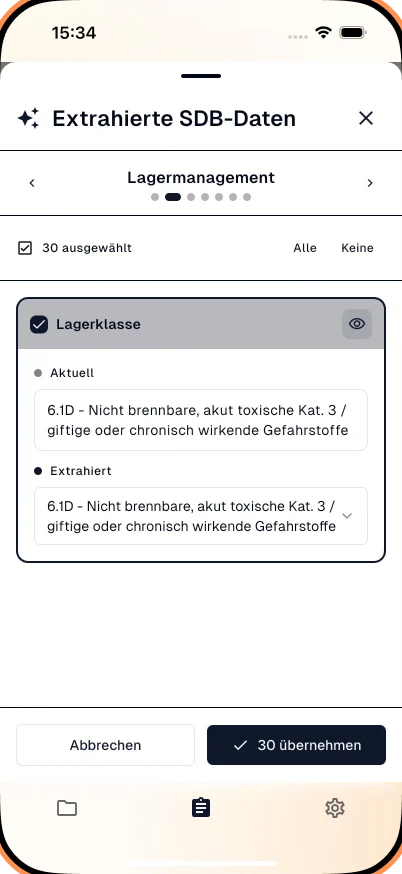
Your benefits at a glance
The module is designed for practical use – usable on mobile and seamlessly integrated into your existing processes.
Manage SDSs digitally
Store, search and link safety data sheets to hazardous substances in one place.
AI extraction
AI reads relevant information from safety data sheets and transfers it into the system – with source references.
Audit-proof documentation
All changes and versions traceable – for audits and evidence for authorities.
Approvals & assignment
Filter hazardous substances by site, department or area of use and manage approvals.
Folder structure & archive
Automatic filing in structured folders – for quick access and a clear overview.
Everyday results
What you typically gain
- No more manual typing of SDS content
- Central, searchable hazardous substance documentation
- Faster reviews and approvals
- Audit-ready records
What it looks like in everyday work
The hazardous substances register is mandatory, safety data sheets are the source – and retyping classification, hazard statements, storage class and limit values for dozens of substances is tedious work where mistakes happen.
In AMS Go you upload the safety data sheet, the AI extracts the relevant data from all 16 sections and shows the location in the document for every value. You review and approve – and the register is current. The same data feeds the operating instruction.
How it works in AMS Go
- 1
Upload the safety data sheet
Via drag-and-drop, from email or photographed with a smartphone. Older formats are processed too.
- 2
AI extracts – with source references
Name, classification, pictograms, H and P statements, storage class, water hazard class, limit values and protective measures are recognised. For every value you see where it was found.
- 3
Review and approve
A qualified person checks the data, adds quantity, work area and storage location and approves the substance. Only then does it appear in the register.
- 4
Keep register and instructions current
The register can be exported at any time. From the data the AI drafts the operating instruction; new data sheet versions trigger an update.
Register, operating instruction, substitution
Companies working with hazardous substances must keep a register with name, classification, quantities, work areas and a reference to the safety data sheet, create operating instructions, brief employees and check for safer substitutes. Safety data sheets must be accessible to employees.
Frequently asked questions
How reliable is the AI extraction?
Recognition is highly accurate for current safety data sheets. The key is the source reference: for every value you see the location in the document and verify it in seconds. Only what a qualified person has confirmed is approved.
Can I import my existing register?
Yes, from Excel or other systems. During onboarding we migrate the register and data sheets and reconcile them with the current versions.
Does AMS Go flag outdated safety data sheets?
Yes. Data sheets older than a configurable period are flagged so you can request the current version from the supplier.
Does the module support several sites and storage locations?
Yes. Each substance can be assigned to several sites, work areas and storage locations with their own quantities; the register can be exported per site or in total.
Modules that go with it
All modules work together – actions, records and deadlines come together in one place.
Operating instructions
Central, versioned, easy to find
View moduleTraining matrix
Plan and document safety briefings
View moduleFolder management
File documents in a structured way
View module
See the module live
In a demo we show you the module with your own examples – 30 minutes, no obligation.