
Action plan – all actions under control
Actions from inspections, risk assessments or trainings often end up in emails, Excel or people's heads. The AMS Go action plan brings them together in one place: assignments, deadlines, reminders – and everything stays visible and traceable for everyone involved.
Ideal forAutomotiveLogistics
Your benefits at a glance
The module is designed for practical use – usable on mobile and seamlessly integrated into your existing processes.
Assignments & responsibilities
Assign actions directly to people. Clearly defined: who does what by when – visible to everyone.
Deadlines & reminders
Set deadlines and use automatic reminders. Trainings, inspections or actions – nothing slips through.
Linked to inspections & risk assessments
Deficiencies from inspection reports and risk assessments flow in automatically – no duplicate entries.
Priorities & overview
Filter and prioritize open tasks and keep track of them across teams.
No manual follow-up
Instead of emails, Excel or sticky notes: one central source for all actions and their status.
Everyday results
What you typically gain
- Clarity: who is responsible for which action?
- Fewer overdue actions thanks to automatic reminders
- No more searching through emails or spreadsheets
- Transparency for managers and safety staff
What it looks like in everyday work
Most defects in occupational safety are known – they just do not get fixed. Actions sit in reports, spreadsheets and emails without anyone having an overview of what is open and who is responsible.
The action plan is the one list where all actions from all modules come together: from risk assessments, inspections, tests, committee meetings and incidents. Every action has an owner, a deadline and a status – and reminds people by itself.
How it works in AMS Go
- 1
Actions arise where issues are found
A finding in an inspection, a measure in the risk assessment, a resolution in the safety committee: one click turns it into an action – with source, photo and context.
- 2
Set owners and deadlines
Choose owner, deadline and priority. The person is notified via app or email and sees their open tasks at a glance.
- 3
Complete and prove
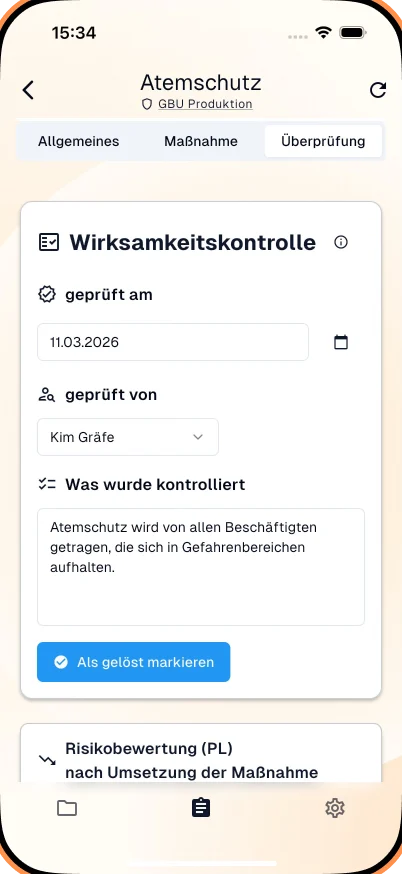
Completed actions are closed with a comment and photo. For important actions AMS Go asks after a few weeks whether they are effective.
- 4
Overview for management
Management and safety specialists see per site what is open, overdue and done – as a dashboard or export for the safety committee.
Implement measures and verify effectiveness
Occupational safety law requires not only defining measures but implementing them and checking their effectiveness. Companies that demonstrably follow up on actions fulfil their organisational duty – and after an incident can prove that known defects were being addressed.
Frequently asked questions
Do owners get automatic reminders?
Yes – on assignment, before the deadline and when overdue, via app and email. You configure the intervals. Managers see overdue actions in their area.
Can people without an AMS Go account complete actions?
Owners need an account, which is included depending on the plan. External service providers get guest access with limited rights.
Can the action plan be exported?
Yes, as Excel or PDF – filtered by site, area, status or period. This is the typical basis for committee meetings and management reviews.
How is the action plan connected to the other modules?
Every action knows its source: the hazard, the inspection item, the test or the committee resolution. From there you jump into the context and back with one click.
Modules that go with it
All modules work together – actions, records and deadlines come together in one place.
Safety inspections
Mobile, structured, traceable
View moduleRisk assessments
Digital, structured, with AI
View moduleOHS committee minutes
Document committee meetings easily
View module
See the module live
In a demo we show you the module with your own examples – 30 minutes, no obligation.