
Risk assessments – digital, structured, with AI
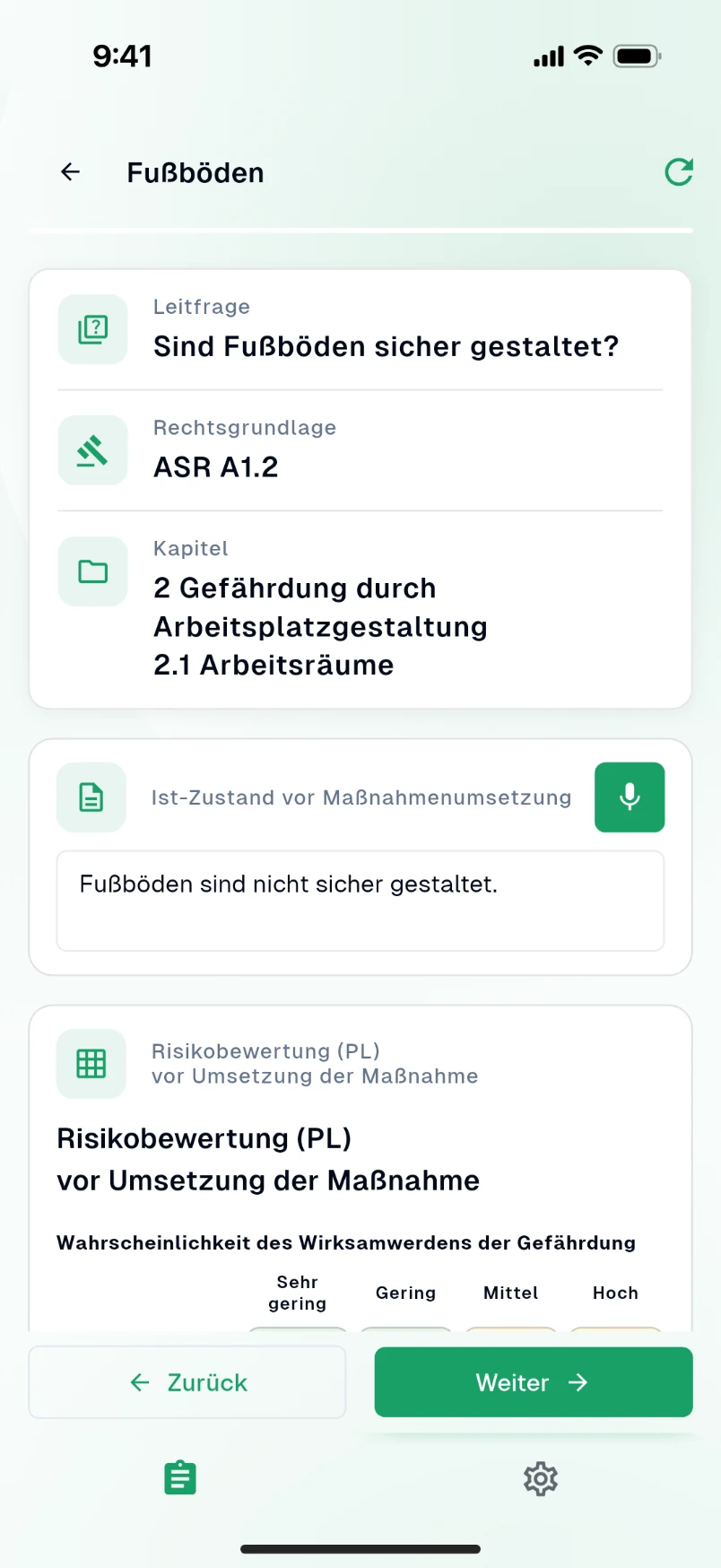
Risk assessments are the backbone of occupational safety. With AMS Go you record hazard factors in a structured way, use templates and AI suggestions, document the current state including photos and link everything seamlessly to your action plan.
Ideal forMetalworkingMachinery
Your benefits at a glance
The module is designed for practical use – usable on mobile and seamlessly integrated into your existing processes.
Structured recording
Hazard factors by category and industry – from the hazard factor catalog to individual customization.
AI support
AI suggests hazard factors and helps you describe the current state and the actions to take.
Mobile use
Carry out assessments right at the workplace – with photos of the current state and seamless sync with the web app.
Linked to the action plan
Identified deficiencies appear directly in the action plan. Assign actions, set deadlines, use reminders.
Versioning & archive
All revisions stored in an audit-proof way – images and documents automatically sorted into folders.
Everyday results
What you typically gain
- Faster creation thanks to templates and AI assistance
- Transparency: who is working on what, and by when?
- Less duplicate work and manual follow-up
- Audit-ready documentation available at any time
What it looks like in everyday work
The risk assessment is the foundation of every occupational safety organization – and in many companies it is a Word document nobody has touched in years. In AMS Go it becomes a living document: structured by work areas and activities, guided by the eleven hazard factors, with actions that go straight into the action plan.
For every activity the AI suggests typical hazards and protective measures. You review, add and rate – so an afternoon is enough for what used to take days, without compromising quality.
How it works in AMS Go
- 1
Set up work areas
Structure the company into areas and activities, for example “Warehouse – picking with pallet truck”. Similar workplaces are grouped, sites stay separate.
- 2
Identify hazards – with AI
For each activity the AI proposes hazards across all eleven hazard factors. You accept what applies, add observations from inspections and attach photos.
- 3
Rate risks and define actions
Likelihood and severity give the risk. Actions follow the STOP principle – with an owner and a deadline that automatically appear in the action plan.
- 4
Check effectiveness and keep it current
Completed actions ask for their effectiveness. When something changes you update only the affected activity; the history shows who changed what and when.
Mandatory from the first employee
Every employer must assess working conditions, define measures and document the result (sections 5 and 6 of the German Occupational Safety Act). Additional requirements apply to work equipment, hazardous substances, workplaces and maternity protection. No specific format is prescribed – what matters is that the assessment is complete, current and traceable.
Frequently asked questions
Can I migrate existing risk assessments?
Yes. During onboarding we import existing assessments from Word, Excel or other systems and build the structure in AMS Go from them. You never start from scratch.
How good are the AI suggestions?
The AI knows typical hazards and measures for hundreds of activities and proposes them as a draft. The professional judgement stays with you or your safety specialist. In practice it mainly saves the time spent collecting information.
Are there templates for my industry?
Yes, for the industries we serve – including metalworking, plastics and chemicals, food, logistics, construction, skilled trades, healthcare and municipalities. Templates are starting points you adapt to your company.
How is the assessment documented?
Every change is logged with date and person, earlier versions remain available. For authorities, insurers or audits you export the assessment of an area or an entire site as a PDF.
Modules that go with it
All modules work together – actions, records and deadlines come together in one place.
Action plan
All actions under control
View moduleOperating instructions
Central, versioned, easy to find
View moduleSafety inspections
Mobile, structured, traceable
View module
See the module live
In a demo we show you the module with your own examples – 30 minutes, no obligation.